Secret Messages
🤫 Unlocking Mystery in Your Chats: Introducing the /secret Command on Bot
Have you ever wanted to share a movie spoiler without ruining it for the whole group? Or perhaps you want to send a digital gift card code that only the first person to click can see?
We are excited to announce the brand new Secret Package feature for Bot. With the simple command /secret, you can hide text and images behind a secure link or code, adding a layer of mystery and privacy to your Telegram conversations.
Here is how it works.
🚀 Two Ways to Create a Secret
We designed this feature for flexibility. Whether you are planning an elaborate surprise or just want to quickly hide a specific sentence, we have you covered.
1. The "Secret Package" (Multi-Message Mode)
This is perfect when you want to bundle multiple texts, photos, or hints into one single secret reveal.
- How to use: Simply type
/secretin the chat with the bot. - What happens: The bot will ask you to send the content you want to hide. You can send multiple text messages or images.
- Finalize: When you are done adding content, click the "Finish input" button. Bot will wrap everything up into a secure package.
2. The "Quick Lock" (Reply Mode)
This is the fastest way to turn an existing message into a secret.
- How to use: Reply to any specific message (text or image) and type
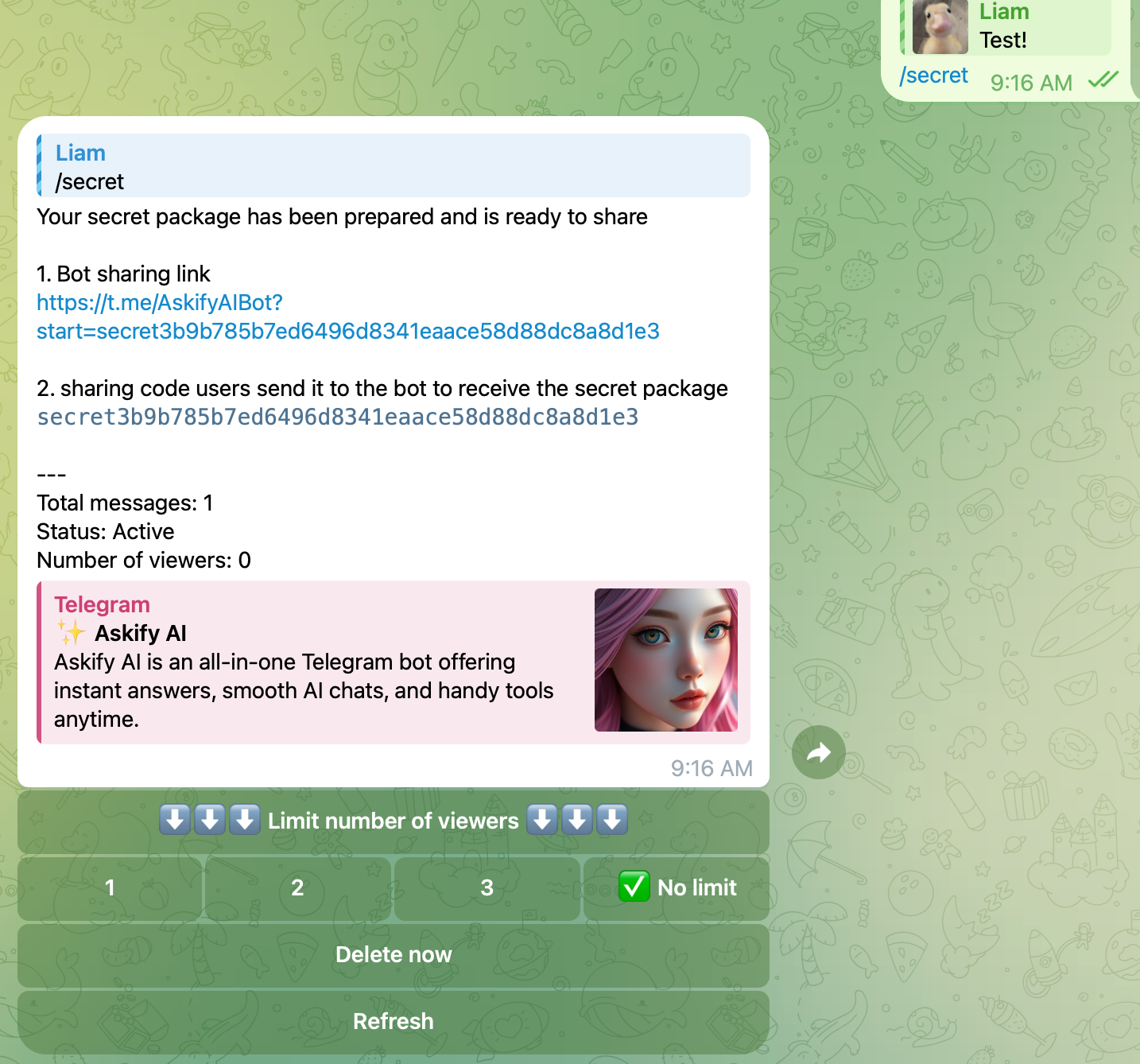
/secret. - What happens: Bot instantly converts that single replied message into a secret package and generates your sharing code immediately.
🔐 Sharing and Viewing
Once your secret is created, Bot provides you with two ways to share it:
- A Direct Link:
t.me/AskifyAIBot?start=secret...(Users click this to go straight to the reveal). - A Sharing Code: A unique string (e.g.,
secret3b9...) that users can copy and send to the bot.
⚡ Feature Highlights
- Viewer Limits: You are in control. Set the secret to be viewable by 1 person, 2 people, 3 people, or No Limit. This is perfect for "First come, first served" giveaways!
- Multimedia Support: Hide not just text, but images too.
- Management: You can see the status of your secret (Active/Used) and delete it manually at any time using the "Delete now" button.
💡 Cool Ways to Use /secret
- 🚫 Spoilers: Discuss the latest episode of a show without angering your friends who haven't watched it yet.
- 🎁 Giveaways: Share a promo code or gift card link and set the viewer limit to 1. The fastest finger gets the prize!
- 🕵️♂️ Scavenger Hunts: Leave clues or codes that lead to the next puzzle.
- 💌 Private Confessions: Send a message that feels a little more personal and exclusive.